Entire Gemini chat for reference
I was just normally using my laptop when a windows defender notification kept popping up.
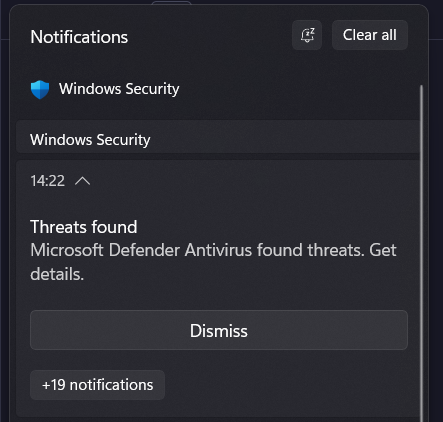
When I looked into it in Defender, I was not getting anything more than just the PID - 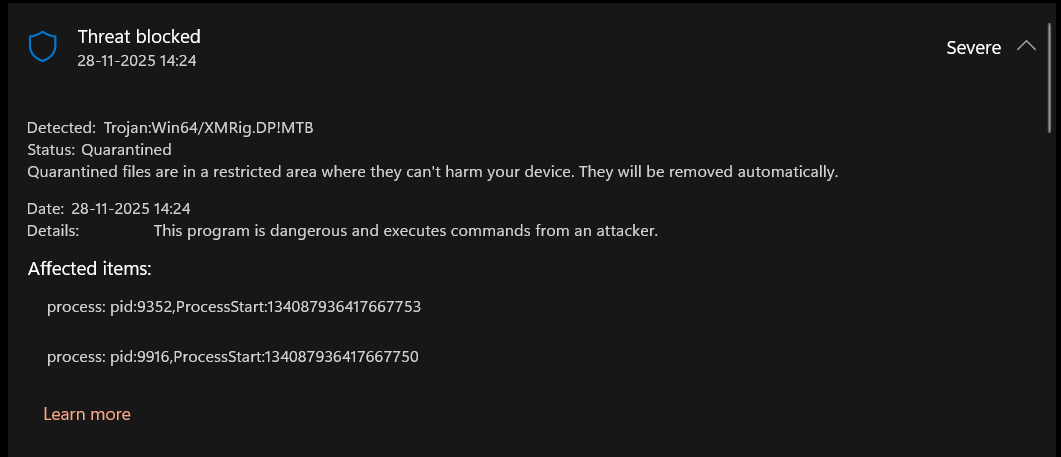
Initially, when I searched for it and tried to understand if it was a false alarm by the antivirus, I almost believed that this must be something from NVIDIA or the many games on my laptop that might be doing something to improve the performance which defender is picking up as a threat. But just out of curiosity I asked Gemini-3 (Thinking) to give me a command to see the trace of the PID.
Get-MpThreatDetection | Sort-Object InitialDetectionTime -Descending | Select-Object -First 1 | Format-List Resources, ProcessNameWhich gave the following output -
Resources   : {process:_pid:15928,ProcessStart:134087911213879758, process:_pid:19712,ProcessStart:134087911214340015}

ProcessName : C:\Program Files\NVIDIA Compute\GPU Control\NvidiaGPUControl1.exe
At this point, Gemini told me that all the NVIDIA Drivers are in the C:\Program Files\NVIDIA Corporation and not the NVIDIA Compute folder. This was the moment when I got a bit worried about the threat. Although, not directly harmful, but the thought of clogged resources, a slow machine, and junky experience for something that I am not even doing, at the expense of some else’s compute happened to be a very indigestible, non - comprehensible, uncomforting, unacceptable and the I-cannot-allow-this feel igniting thing for me. Defender was already blocking the process from spawning, but the notification that kept popping each minute kept bugging me. I had realized that I was safe, and that the attack was not working (thanks to Defender), but Gemini had also got me curious to check if it can help me stop the actual threat (the process that kept respawning the threat every minute).
So, I asked dear Gemini to create a script for me to help me do this. And so, after a few prompts here and there, and a few (good) scripts that lead nowhere, Gemini came up with a script to look for any parent script that keeps creating this virus. It also figured out that such a parent script would contain the term “NVIDIA Compute” to do the folder recreation.
Write-Host "Searching for the script that creates the virus..." -ForegroundColor Cyan
$searchPaths = @("C:\Windows", "C:\ProgramData", "$env:APPDATA", "$env:LOCALAPPDATA")

Get-ChildItem -Path $searchPaths -Recurse -Include *.bat,*.vbs,*.ps1,*.cmd,*.nk -ErrorAction SilentlyContinue |
Select-String -Pattern "NVIDIA Compute" -List |
Select-Object Path, Line | Format-List
And voilà! The culprit was found in the C:\Windows\CPU folder. So, I tried force deleting it but windows being windows did not allow me to do that since some of the files in this threat folder were still running. Can you guess what I did next? YES! I asked Gemini to write another script to force delete this folder, and it did a great job at it!
# --- CONFIGURATION ---
$MalwareFolder = "C:\Windows\CPU"
$ProcessName = "XboxMinApi"

Write-Host "--- INITIATING FORCE DELETE SEQUENCE ---" -ForegroundColor Cyan

# STEP 1: KILL THE PROCESS
# We try to find the process by name and force-kill it
$proc = Get-Process -Name $ProcessName -ErrorAction SilentlyContinue
if ($proc) {
    Write-Host "[!] Found active process: $ProcessName" -ForegroundColor Yellow
    Stop-Process -Name $ProcessName -Force
    Write-Host "    [+] Process Killed. File lock released." -ForegroundColor Green
} else {
    Write-Host "[~] Process '$ProcessName' not running (or already dead)." -ForegroundColor Gray
}

# STEP 2: KILL ANYTHING ELSE IN THAT FOLDER
# Sometimes the virus changes names. We kill ANYTHING running inside C:\Windows\CPU
$hiddenProcs = Get-CimInstance Win32_Process | Where-Object { $_.ExecutablePath -like "$MalwareFolder*" }
foreach ($p in $hiddenProcs) {
    Write-Host "[!] Found hidden process in folder: $($p.Name) (PID: $($p.ProcessId))" -ForegroundColor Red
    Stop-Process -Id $p.ProcessId -Force
}

# Short pause to let Windows release the file handles
Start-Sleep -Milliseconds 500

# STEP 3: DELETE THE FOLDER
if (Test-Path $MalwareFolder) {
    Write-Host "Deleting folder: $MalwareFolder..."
    try {
        Remove-Item -Path $MalwareFolder -Recurse -Force -ErrorAction Stop
        Write-Host "[SUCCESS] Folder deleted successfully." -ForegroundColor Green -BackgroundColor Black
    } catch {
        Write-Host "[ERROR] Could not delete folder. Details: $($_.Exception.Message)" -ForegroundColor Red
        Write-Host "Tip: If it says 'Access Denied', restart in Safe Mode."
    }
} else {
    Write-Host "[SUCCESS] The folder is already gone." -ForegroundColor Green
}
Although this felt like an overkill for force deleting a file compared to rm -r but now the threat was completely gone, and I take in a peaceful breath.
I found this experience with Gemini quite wonderful and thought why not share it! More so because of how genuinely helpful Gemini was as compared to Perplexity (which was getting confused and confusing me at the same time for the same issue, something that I had experienced multiple times in the past).
Anyway, I hope this blog inspires you to trust the powers of LLM and using these tools in your day-to-day life to help with such things that would usually require a lot of paid expertise and knowledge to get through with. Adios amigos! Hope you have a good time! Because greater times are yet to come.